
How to use JNR Vapes? Compared with integrated disposable vapes, the popular JNR Vapes with replacement pods seem to be way more complicated. Nevertheless, they can also be rather simple when being broken down into several steps. From composing to troubleshooting, our comprehensive guide will show you the full process of how to use your vapes and pods. Follow the instruction, and you’ll become a master of JNR Vapes and be good to enjoy your favorite JNR flavors the next moment.
Quick Links: How to Prepare | How to Setup | How to Read Screen | How to Charge | How to Refill | More Questions
Step #1 – Preparation
When you purchase a JNR Vape as a kit, here’s what you’ll find in the box:
- JNR Vape Device[Pod+Battery]*1 If you run into any leaking issues after installing your pod, our JNR vape leaking guide covers every type of leak and how to fix it.
- JNR Pre-filled Pod*1
- JNR E-liquid Bottle*4
- User Manual (for detailed instructions)
Before setting up your device, make sure you’ve got all these parts.

Step #2 – Setup
Before using your device, you’ll have to do some basic setups, making sure the pod is properly inserted into the device. Follow the simple steps below:
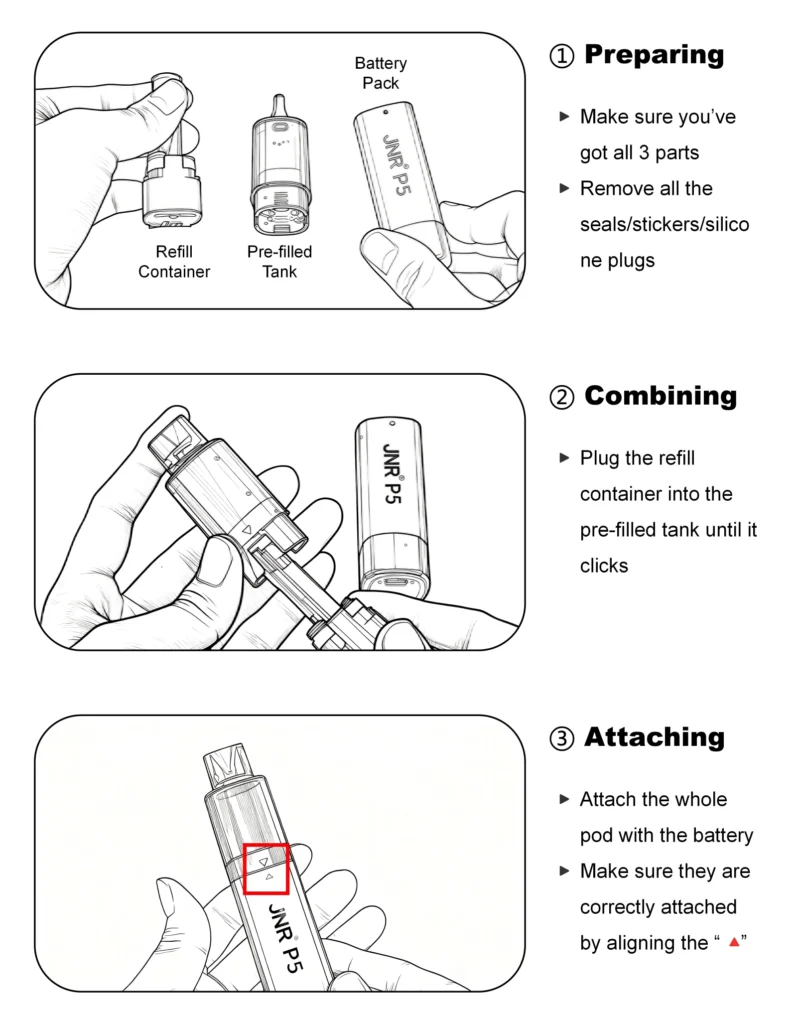
JNR P5 GlassRock
The way to set up your P5 GlassRock is very simple. After unboxing, you’ll have only 3 steps to do:
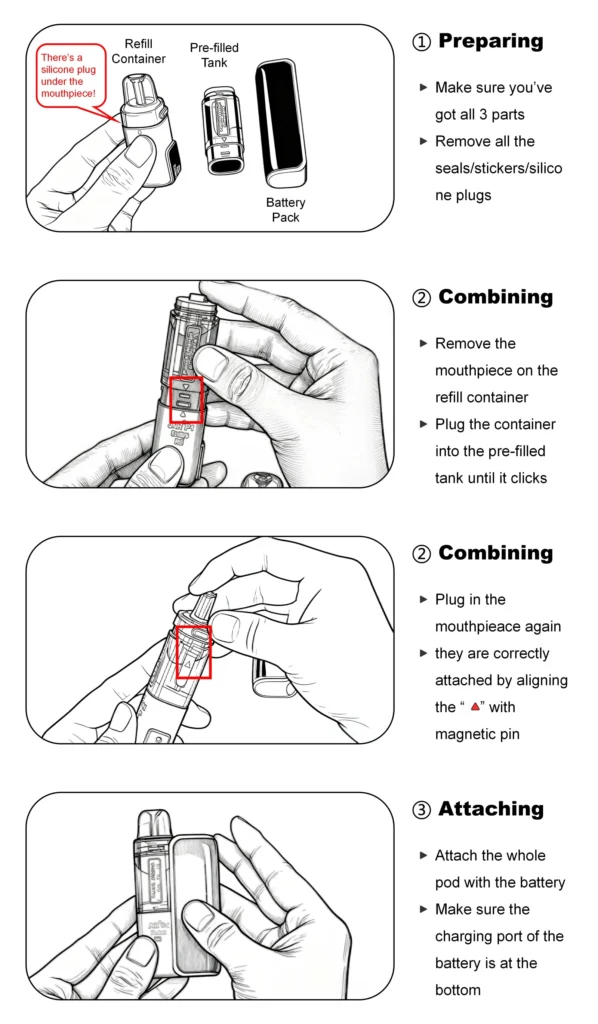
JNR P4 Stellarc
With a larger screen, the setup of P4 Stellarc will be slightly complicated than that of P5. Nonetheless, you’ll only have to do one more step to enjoy the best vaping experience.
To activate your JNR Vape, simply take a draw (inhale) from the mouthpiece. Since both JNR P4 and P5 are draw-activated devices, no buttons are necessary.
Step #3 – What’s on Screen
After turnning on your device, all you need to do is vaping. However, after using your device for a while, it’s necessary to keep an eye on the current status of your device – through the screen display. So, what’s on the screen?
Battery Level
Both JNR P4 & P5 have their screens, which will be activated as oon as you set up the device successfully. And there will be a battery indicator on the screen to show you the real-time battery level.
- For JNR P4 Stellarc, the battery level (%) will be shown at the middle of the side screen.
- For JNR P5 GlassRock, the battery level (%) will be shown near the bottom of the device.
Animation
In addition to the battery indicator, you’ll also notice some animations on the screen display. This is part of JNR’s user-friendly design, which is about to give you visual enjoyment as well.
- For JNR P4 Stellarc, there will be the animation of shooting star on the screen.
- For JNR P5 GlassRock, there will be some blinking signs (smiley face, heart, etc.) on the screen.
What About E-liquid Level?
In addition to the battery level, you may also wonder where the e-liquid indicator is. In fact, both JNR P4 & P5 feature a visible tank, which allows you to monitor the amout of e-liquid through the tank immediately. With such a convenient feature, you’ll have everything in control even without the battery.
Step #4 – Charging
If you find your device in a low battery level (15% or less), then it’s time to recharge your device. Just like most disposable vapes, JNR Vapes all have a charging port at the bottom of the battery pack.
Prepare the Cable
Though there are lots of parts in a kit, there’s actually no charging cable included. So before charging your device, make sure you’ve got a USB Type-C charging cable with you.
How Long Does It Take?
Charging typically takes around 1-2 hours, depending on your device’s battery level. Despite the fact that you can start vaping during charging, for the battery health and longevity, we still recommend not to vape until the battery is fully charged.
Step #5 – How to Refill JNR Vape
And what to do if the pre-filled e-liquid runs out? With the 4x 10mL e-liquid bottles, you’ll never have to worry about reloading your artillery. To refill the pod, simply detach the refill container and refill it with a new bottle of e-liquid.
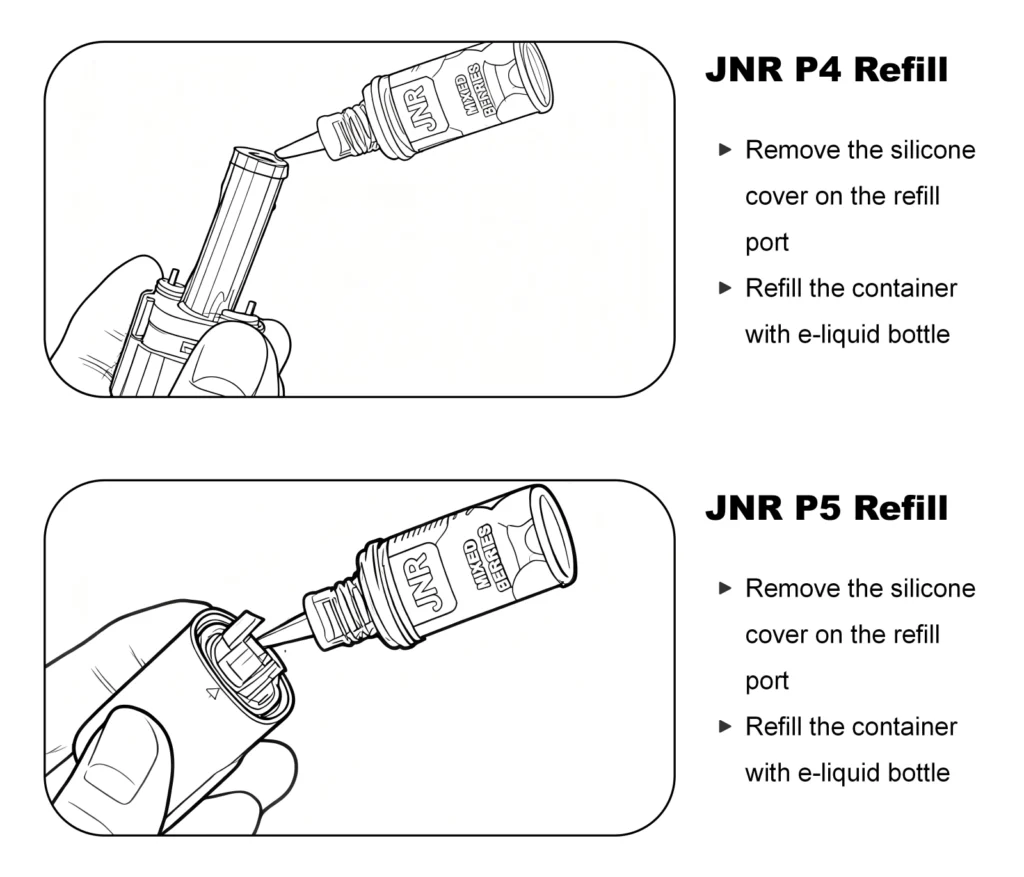
Be sure not to overfill it, and once refilled, securely close the port before reinserting the pod back into the device.
Got more questions? Check our FAQ page or contact us!
Frequently Asked Questions
JNR Stellarc Vape Not Working? Quick Fixes
First, try plug in a Type-C cable to the battery pack. If the battery pack can be activated normally and the battery level is low, charge the battery for a while.
My JNR vape is not hitting?
If your vape isn’t hitting, try the following:
Ensure the pod is properly inserted: Sometimes the pod may not be making a good connection with the device. Remove and reinsert it.
Check the battery level: If it's low, recharge your device.
Clear any blockages: Make sure the mouthpiece and airflow path are clean.
Wait a few seconds: Some vapes require a moment to "wake up" after being inactive.
Why can't I charge my JNR vape?
If your JNR Vape isn't charging, make sure:
The USB cable is securely connected: Sometimes, a loose connection can cause charging issues.
Try a different power source: If you’re charging from a computer, try using a wall adapter or power bank.
Check the charging port: Make sure the charging port is clean and free of debris. A dirty port can prevent the charging cable from connecting properly.
Can I refill the pods of JNR P4 with the e-liquid of JNR P5?
You may. As refillable vapes, most JNR devices are compatible with e-liquid of other devices. However, given the different formula and material, e-juice from other brands may not be compatible to your JNR devices.
How can I adjust the airflow?
You may customize the airflow of JNR P4 Stellarc, which has an airflow control switch at the bottom of the pod. Simply switch to each end to get looser or tighter hit. However, for P5 GlassRock, the device is too compact to have such feauture.
Can I use my JNR Vape while charging?
It is technically safe to use your JNR Vape while it’s charging, but it’s generally not recommended. This can increase wear on the battery over time. For the best performance and longevity, it’s ideal to let the device charge fully before use.